User management
Tip
It is strongly recommended to configure your tenants and LDAP servers (if you intend to use them) before creating users.
This page allows you to manage the accounts used to access the Avalon application. Users can be of type Local (managed directly in Avalon) or LDAP (authenticated through an external LDAP/Active Directory server).
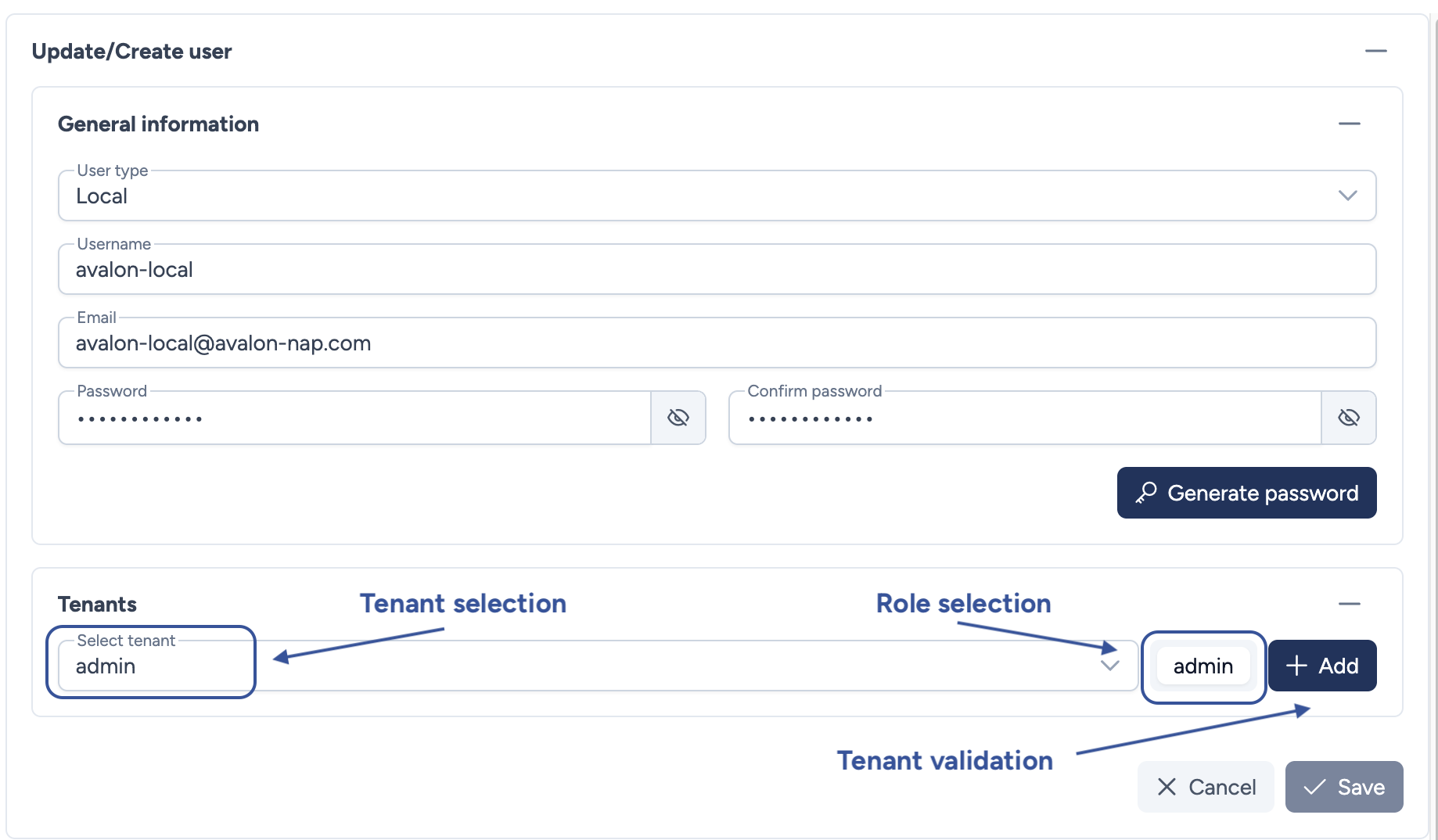
Configuration parameters
This section covers the information required to create or update a user account and assign privileges.
- User Type: Defines the origin of the account:
- Local (internal to Avalon)
- LDAP (external authentication)
- Username: The unique identifier used for login. Must be unique across all user types.
- Email: The user's email address.
- Password: The account password. Mandatory for Local users.
- Confirm password: Confirmation of the password.
- Tenant selection: Select the target tenant from the dropdown menu (e.g.,
admin) to define the management scope. - Role selection: Select the appropriate role (e.g.,
admin,user) to determine permissions within that tenant. - Tenant validation: Click Add to finalize the assignment. A user can have multiple tenant assignments.
Password Generation
You can use the Generate password button to automatically create a strong, secure password.
Minimum assignment required
A local user must be assigned to at least one tenant to be created. The Save button will remain disabled until a tenant assignment is added. For LDAP users, tenant-role assignment is optional: they can log in using LDAP group mappings only.
User roles
For each tenant assignment, you must select a role that defines the user's permissions. Avalon includes a full RBAC system since version 1.3.5: see the Role management page for details on available permissions.
By default, three roles are available:
- admin: Full administrative access. The user can perform any tasks available in Avalon.
- user: Read-only access. The user can consult data from Avalon but cannot trigger any actions towards the network.
- admin_avalon: Dedicated role for the
adminsystem account.
You can create as many custom roles as needed from the Role management page.
Administrator access
Access to the Administration interface relies on the Administrator attribute (is_administrator), configurable globally for each user. When this attribute is enabled, the user can access the Administration page without selecting a tenant first.
Note
The Administrator attribute is independent of roles and tenant assignments. It only controls access to the Administration section.
Local vs LDAP users
-
Local users:
- Password is stored hashed in Avalon's database
- You can reset the password if lost, but cannot retrieve it
- Email address is managed in Avalon
-
LDAP users:
- Password is verified by the LDAP server
- Passwords are not stored in Avalon's database
- Email address is retrieved from the LDAP server
Note
You cannot create an LDAP user if no LDAP server is configured in the LDAP settings.
Actions
- Cancel: Discards all changes and returns to the user list.
- Save: Validates and saves the user account.
Tip
Roles can be automatically assigned to LDAP users based on their Active Directory groups. See the LDAP Mappings page for details.