Device models
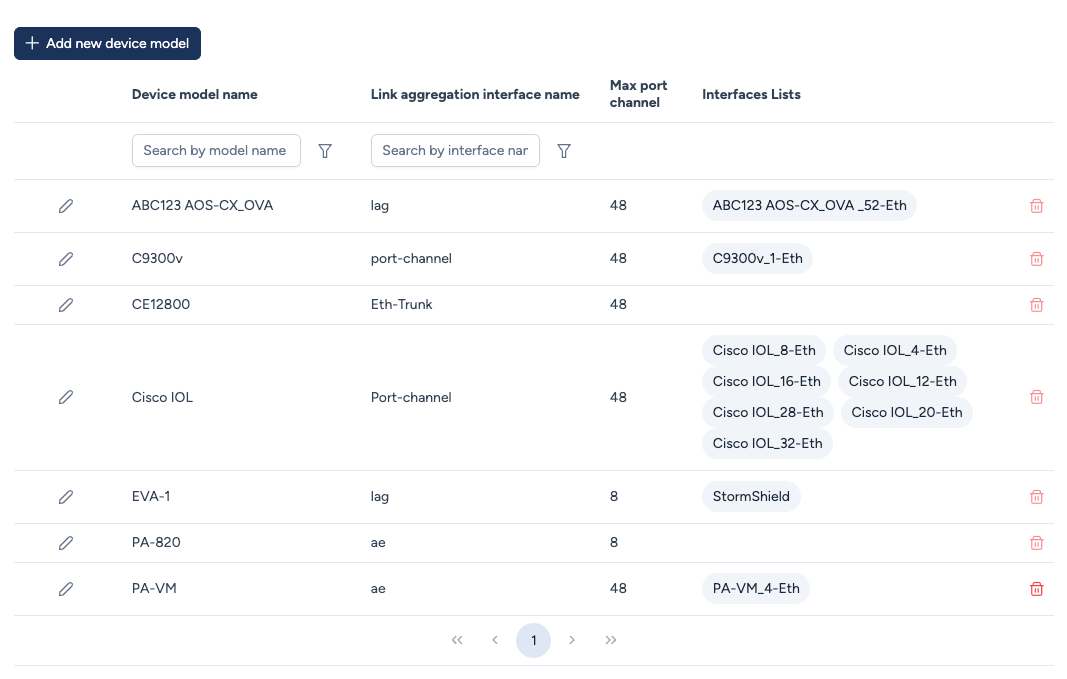
The Device Models section defines specific hardware references (SKU). This definition is necessary to associate each device with its model in the inventory.
Origin of Data: Hybrid Management
Device models in Avalon can come from two sources:
- Autodiscovery: When Avalon scans a network, it automatically creates the model if it's new.
- Manual Creation: Necessary in the following cases:
- Static Devices: ISP routers, security appliances that cannot be scanned but must appear on the map.
- ZTP (Zero Touch Provisioning): To integrate a new device model that doesn't yet exist in the network. The interface list must be defined to allow connection of the new device to the existing infrastructure.
Configuration
When manually creating a model, you must define:
- Device model name: The precise hardware SKU (e.g.,
C9300v,PA-820). - Interfaces Lists: Links the model to physical port lists (e.g.,
Cisco IOL_8-Eth). This defines how many ports appear on the device in the topology view. - Link aggregation: The prefix the vendor uses to name an aggregate (
Port-channel,Bridge-Aggregation,Eth-Trunk,lag). It is inherited from the platform during discovery. - Max port channel: The highest aggregate number this model accepts.
Set Max port channel before creating aggregates
Every model created by autodiscovery receives the generic value 48, which does not come from the device. Yet the number of aggregates a device accepts varies widely between models, and a number above the maximum is rejected by the device at configuration time.
If you plan to create aggregates manually, set the value the model actually supports first, as stated in the vendor documentation. It then guards you against creating an aggregate whose number is beyond what the device can handle.
Target image for the model
The Target NOS image column declares, model by model, the image every device of that model is meant to run. It is a fleet-level decision, made once in the catalog, not a per-campaign setting.
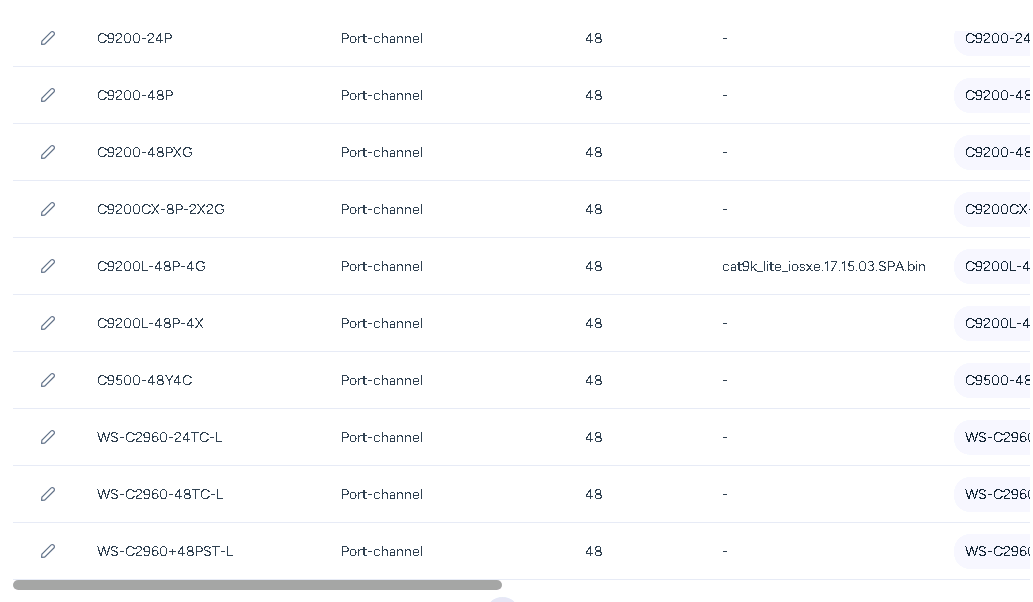
What reads it. Only upgrade engineering rules. A rule names no image: it resolves the target on each device's model, which is how a single rule covers a mixed fleet. Upgrades started from the map or from the scheduler do not use this field, they name the image explicitly.
What the list offers. An image belongs to a device family, so the field only offers the images of the model's family. A model attached to no family has no possible choice, and the field says so instead of showing an empty list.
Leaving it empty is a valid answer. A model with no declared target means "leave every device of this model alone": the rule skips it rather than failing. This is how you restrict a campaign to part of the fleet without touching the rule itself.
For the full upgrade workflow, see the Device upgrade page.
Process for static devices and ZTP
To add a static device to the map or prepare a ZTP deployment, its Device Model must exist. Ensure you attach or create an Interface List so that you can physically connect links in map.