Device Images (NOS)
The Device Images section acts as the secure repository for Network Operating System (NOS) binaries.
This library centralizes the firmware files used for upgrade operations (ZTP or Day-2 maintenance). By decoupling the image from the specific device model and linking it to the Device Family, Avalon simplifies fleet-wide compliance.
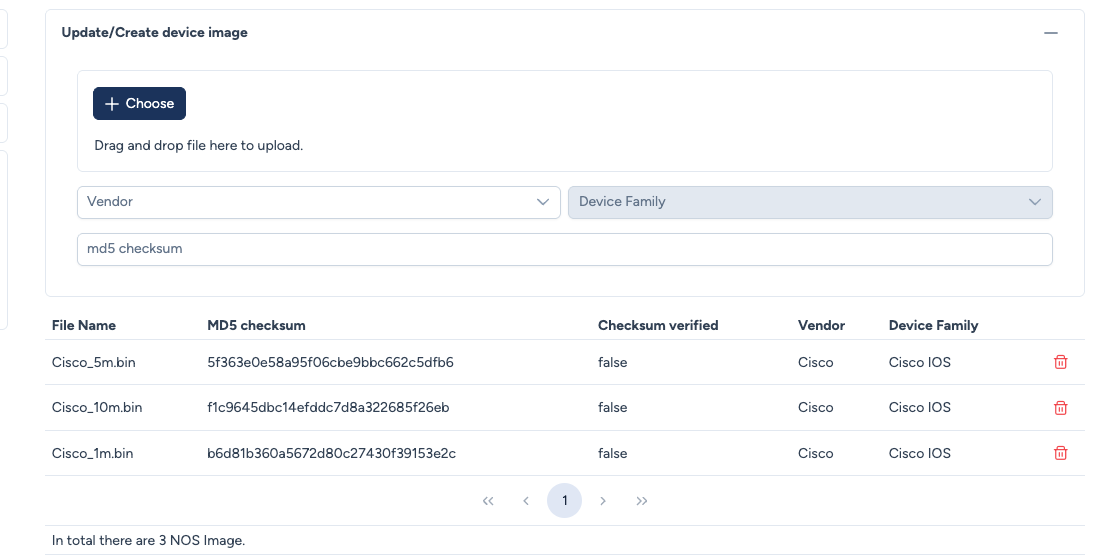
Uploading a New Image
To add a firmware file to the repository, use the upload form at the top of the page.
Warning: Do not leave the page during upload
Uploading an image may take several minutes depending on the file size. Do not close the page or navigate away during the process, or the upload will be interrupted and must be restarted.
Pick the vendor and the family first
The upload button only appears once Vendor and Device Family are both selected. A file
chosen before that stays listed as Pending with no way to send it: this is neither an upload
in progress nor a network problem, Avalon simply does not know yet which family the image
belongs to.
Configuration parameters, in the order to fill them in:
- Vendor & Device Family: Defines the scope of the image, and gates the upload button.
- Rule: Once uploaded, this image becomes eligible for any device model belonging to the selected Family.
- File Selection: Drag and drop the file from your local computer. Two formats are accepted, and only those two:
.binfor Cisco images,.swifor Aruba OS-CX images. They are the two platforms whose image transfer is implemented; any other format is refused at upload.- A
.tararchive: it has to be expanded first, and it is the.binit contains that must be uploaded. Avalon transfers the file then writes a boot path to it, it does not go through the device's own archive extraction procedure.
- A
- MD5 Checksum (Optional but Recommended): You can manually paste the official hash provided by the vendor (e.g., from the Cisco Software Download page).
Integrity verification (MD5)
Avalon implements a rigorous "End-to-End" integrity check to prevent corrupted deployments.
1. Upload Verification (Repository Level) When the file is uploaded, Avalon calculates its MD5 hash on the server side.
- If you provided a checksum: Avalon compares the calculated hash with your input. If they match, the
Checksum verifiedstatus becomes True. - If you left it blank: Avalon stores the calculated hash but flags the verification as False (since no external source confirmed it).
2. Transfer Verification (Device Level) During an upgrade workflow, Avalon uses the stored hash to verify the file integrity again after transferring it to the physical equipment, over TFTP, but before booting it.
3. Verification of an image that is already present
If the file is already on the device's disk, Avalon does not transfer it again and compares its checksum with the catalogue's, since nobody knows who put it there or whether it is complete. On a divergence the operation stops and both checksums are shown: what sits on the disk is not the image that was asked for. Avalon does not decide which one is right and invites you to check the one the vendor publishes, then to remove the file from the device or to upload the right image to the catalogue.