Avalon overview
Avalon automates network operations: device discovery and site mapping, inventory, provisioning down to ZTP, configuration backup, and a trace of every operation. It is multi-tenant, and ships as a virtual appliance on your own hypervisor: everything stays on your premises, including on a site with no internet access.
Avalon's components
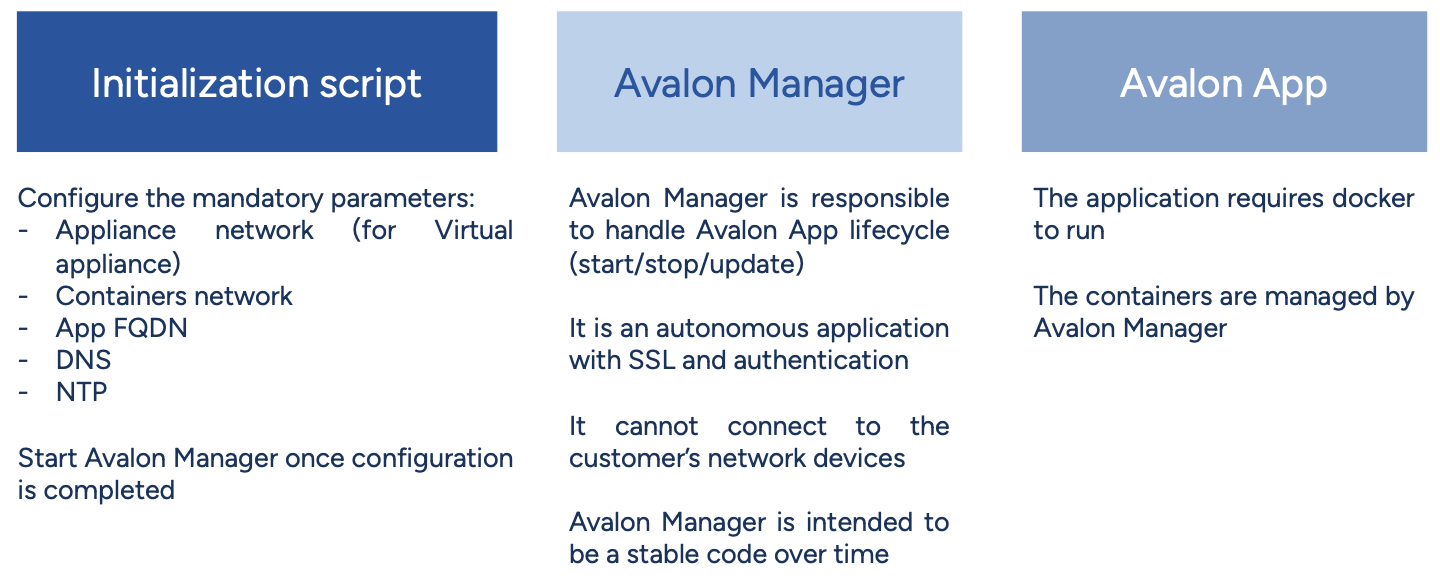
Avalon has three main components:
- Initialization script: Sets up all data required by both Avalon Manager and Avalon App. It also configures the appliance's network services.
- Avalon Manager: A standalone application that manages Avalon’s main application lifecycle. It retrieves releases, starts, stops and restarts Avalon, deletes the releases that are no longer needed, and accepts a release uploaded on a site with no access to our servers.
- Avalon App: The core of Avalon, our platform for network management and automation.
Components overview
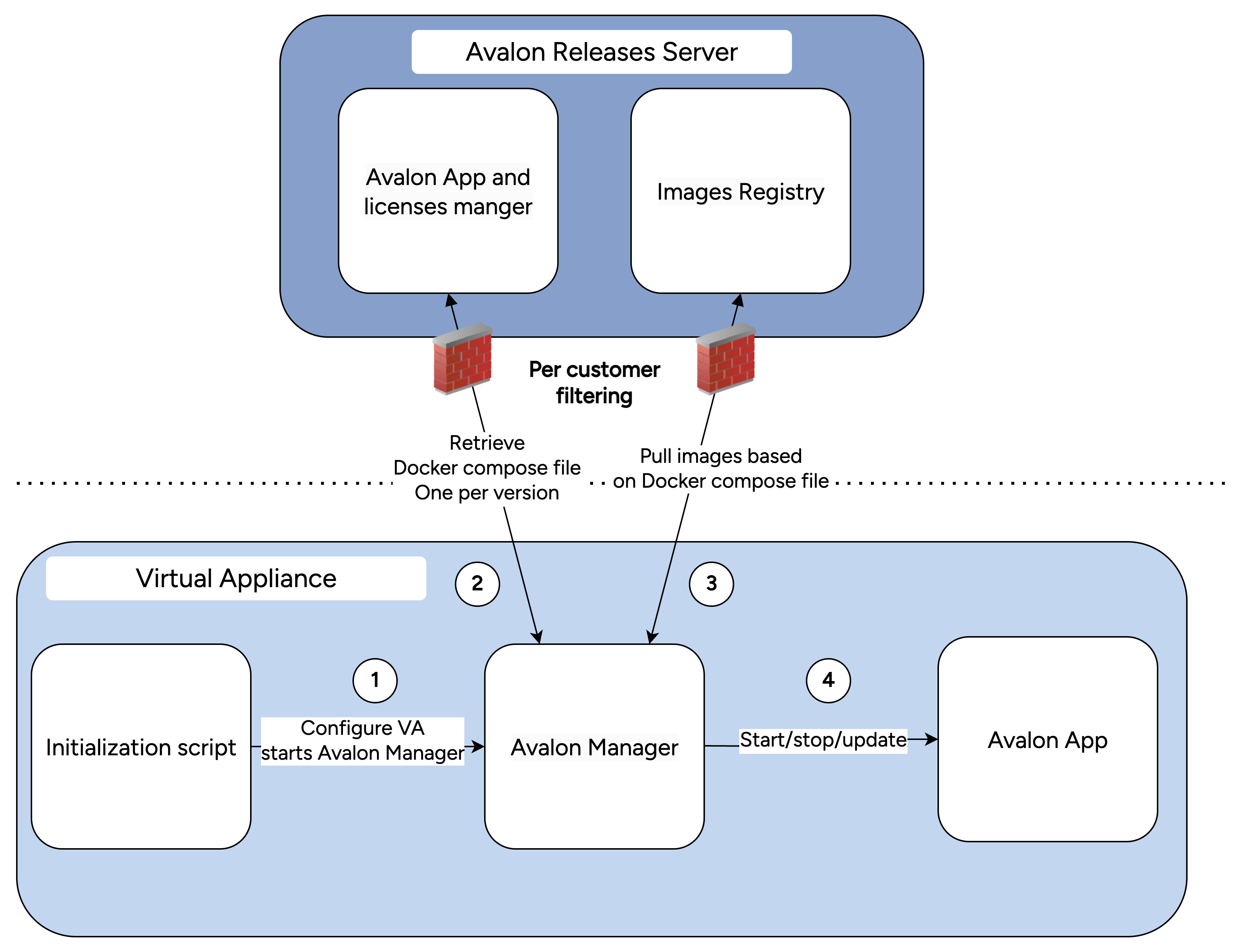
The next diagram shows how those components talk to our servers, and by which path a release reaches the appliance.
How to read this diagram
Arrows show where the files go. The connection itself is always opened by the appliance or by the administrator's workstation, never by our servers.
The license symbol marks where one is needed: in Avalon Manager to download a version from our registry, in Avalon to run, and on the administrator's workstation to sign in to the portal. The appliance, however, needs no license to install a bundle uploaded to it, nor to update Avalon Manager: what gets checked is the signature.
Lifecycles
Appliance installation
Common to both modes, and a prerequisite for everything else. Marked 1 on the diagram.
- You import the OVA on your hypervisor and start the machine.
- On your first connection to its console, the initialization script configures the appliance: network, domain name, passwords, and encrypted data volume.
- Avalon Manager starts, and its interface becomes reachable from your browser.
The OVA is obtained from our website, by requesting a trial, which sends you a personal, time-limited download link. No license is needed at this stage.
It is installed afterwards from the manager's License tab, and it is what opens everything else: access to our servers for online mode, and sign-in to the portal, where the Avalon version bundles and the Avalon Manager binaries are downloaded, each with its signature.
Installation details are on the Virtual appliance page.
Avalon lifecycle in online mode
The appliance reaches our servers. Marked 2a then 3 on the diagram.
- The manager downloads the version you picked and checks its signature.
- You set it as the next version to run.
- You start Avalon, then stop it, restart it, or delete the versions you no longer need.
Avalon lifecycle in offline mode
The appliance does not reach our servers. Marked 2b.1, 2b.2 then 3.
- On the portal, an administrator downloads the
.tarbundle and its.sigsignature. - They upload both to the manager, which checks the signature before installing.
- From there on, it is the same as in online mode.
Avalon Manager lifecycle
- On the portal, an administrator downloads the
.binbinary and its.sigsignature. - They hand both over in the Status tab, which checks the signature and the declared version.
- The manager replaces itself and restarts, without interrupting Avalon.
Always by upload
Up to and including version 1.4.5, Avalon Manager has no online mode. This procedure therefore applies on an appliance that reaches our servers too.
Deployment
Avalon ships as a ready-to-use virtual appliance, to be imported on your hypervisor.
- Format (1.3): OVA, validated on VMware vSphere and Proxmox VE.
- Other formats: on request.
Initial configuration then happens from the appliance's console, and day-to-day operation from Avalon Manager.
Platform compatibility
Full automation support
| Vendor | Platform | Models/Versions | Upgrade Support |
|---|---|---|---|
| Cisco | Catalyst IOS | All models from 2950 (!) to Cat 9K | INSTALL/BUNDLE modes ISSU (Cat 9400 & 9500) |
| Cisco | Nexus NX-OS | 5K/6K, 7K, 9K | - |
| HPE | Aruba CX | All models | VSX procedure |
| HPE | ProCurve / ArubaOS-Switch | All models | Planned Q4 2026 |
| HPE | Comware | All models | Planned Q4 2026 |
| Huawei | CloudEngine, VRP | All models | Planned Q4 2026 |
Topology discovery
| Vendor | Platform | Additional features |
|---|---|---|
| Cisco | IE 1000 / IE 3000 | IE 1000: check connectivity, backup, WebSSH |
| Hirschmann | Classic (beta) | |
| Palo Alto | Firewalls | |
| Stormshield | Firewalls | |
| Arista | EOS |
Your platform not listed?
Avalon's modular architecture enables rapid integration of new platforms. Most vendors can be supported within 2-4 weeks. Contact us to discuss your specific requirements.