Overview page
The Maps page serves as your primary entry point for viewing and managing all your sites. In Avalon, a "Map" represents a Site in your data model-it's the logical container that groups your network devices, physical buildings, and their topology.
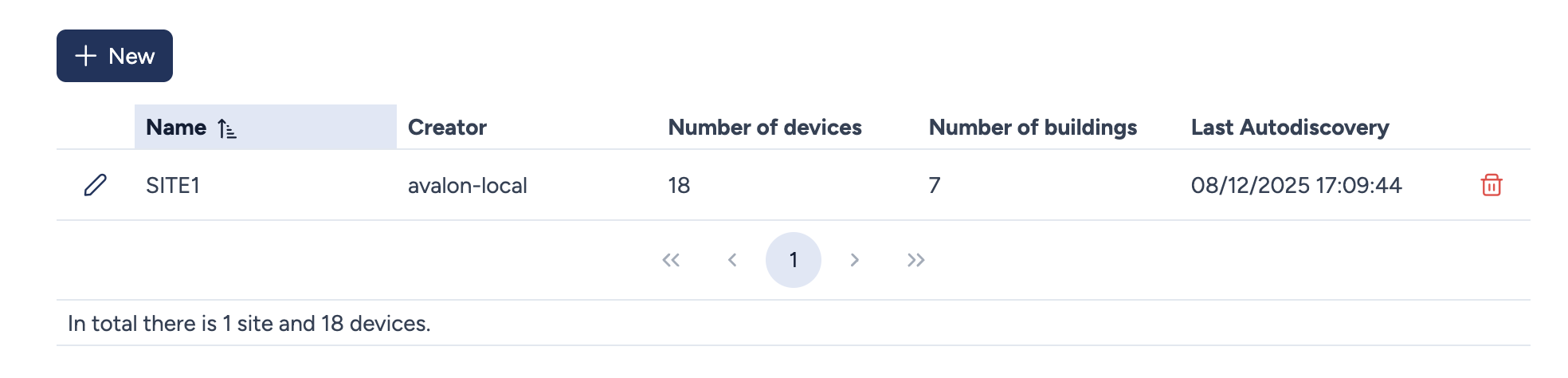
Overview
The main table gives you a comprehensive view of all your deployed sites. For each site, you'll find the following essential information:
- Name: The unique name you've assigned to the site. Click the column header to sort the list alphabetically.
- Creator: The user who originally created this site in Avalon.
- Number of devices: The total count of network devices currently discovered and managed on this site.
- Number of buildings: The number of physical buildings you've defined to structure your site.
- Last Autodiscovery: The date and time of the last successful autodiscovery process executed on this site.
Site Management
Several actions are available directly from this interface to manage your sites on a day-to-day basis:
- New: Launches the creation of a new site through a dedicated modal window.
- pencil icon Opens the site configuration interface to modify its settings.
- trash icon Permanently deletes the selected site. Note that this action is irreversible.
Global Statistics
At the bottom of the page, a summary displays the total count of sites and devices managed within your tenant, giving you an instant overview of your monitored infrastructure.