Netbox Mapping
This modal allows you to configure the mapping rules between your Source of Truth (Netbox) and Avalon for this site.
Context: By default, the mapping defined at the Tenant level applies. However, you can use this form to override those settings for this site. This is useful if this site uses different Device Roles in Netbox compared to the rest of your network (e.g., a Datacenter uses different roles than a Campus site).
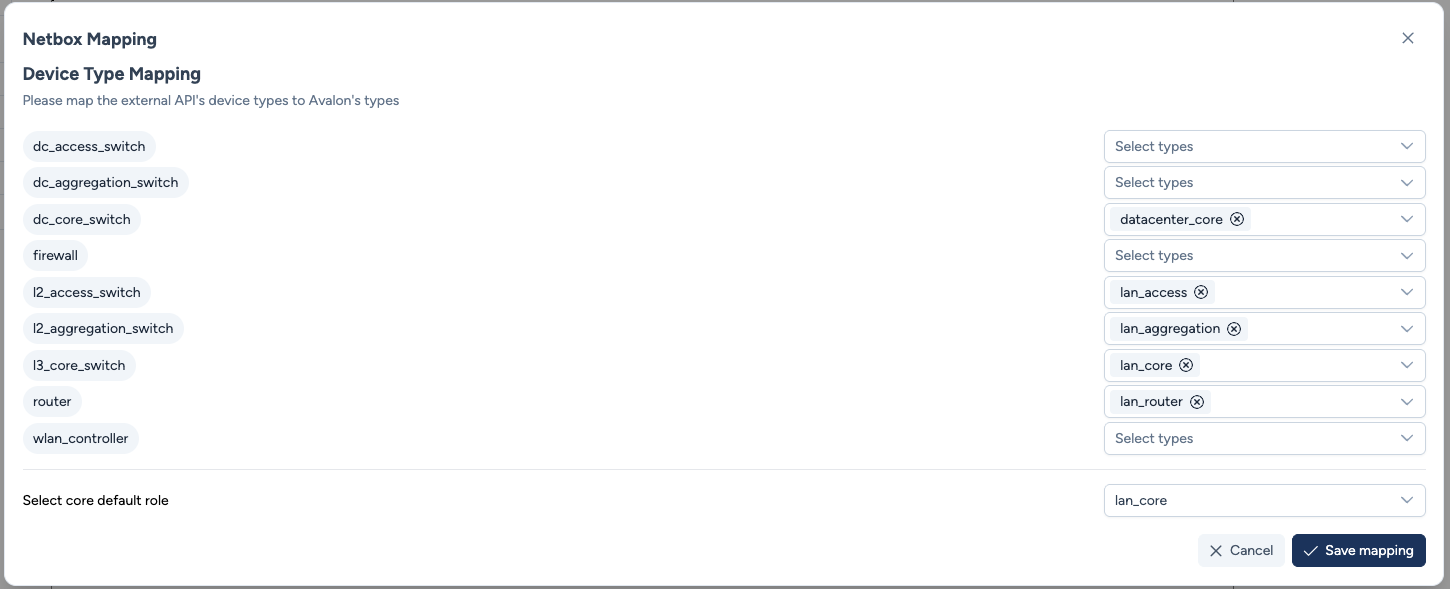
Configuration parameters
The interface displays a list of all supported Avalon device types on the left. On the right, you must select the corresponding "Device Roles" fetched via the Netbox API.
Mapping Logic:
-
Device Type Mapping: For each Avalon type (e.g.,
l2_access_switch), select one or more Netbox Roles (e.g.,lan_access,switch_stack) from the dropdown.- 1:N Relationship: You can map a single Avalon type to several Netbox roles.
- Filtering: Avalon will only import devices matching these mapped roles during the AutoDiscovery process. Any Netbox device with a role left unmapped here will be ignored (e.g., Printers, Patch Panels).
-
Select core default role: Among the mapped roles, you must specify which one is a network core.
The mapping is not available while creating a tenant
At tenant level, the mapping panel only appears when editing an existing tenant, never in the creation form. Save the tenant, then reopen it to set the mapping.
Once the mapping is in place, you can also display the full cabling path of an interface from a link on the map.
Actions
- Cancel: Discards changes and reverts to the previous configuration (or to the Tenant inherited configuration).
- Save mapping: Applies the new rules. Future AutoDiscovery runs for this site will use this configuration.