Site
This page serves as the central management interface for a specific site. It provides you with an interactive topological view of your network, along with a comprehensive set of tools to manage your devices, launch discoveries, and explore your infrastructure.
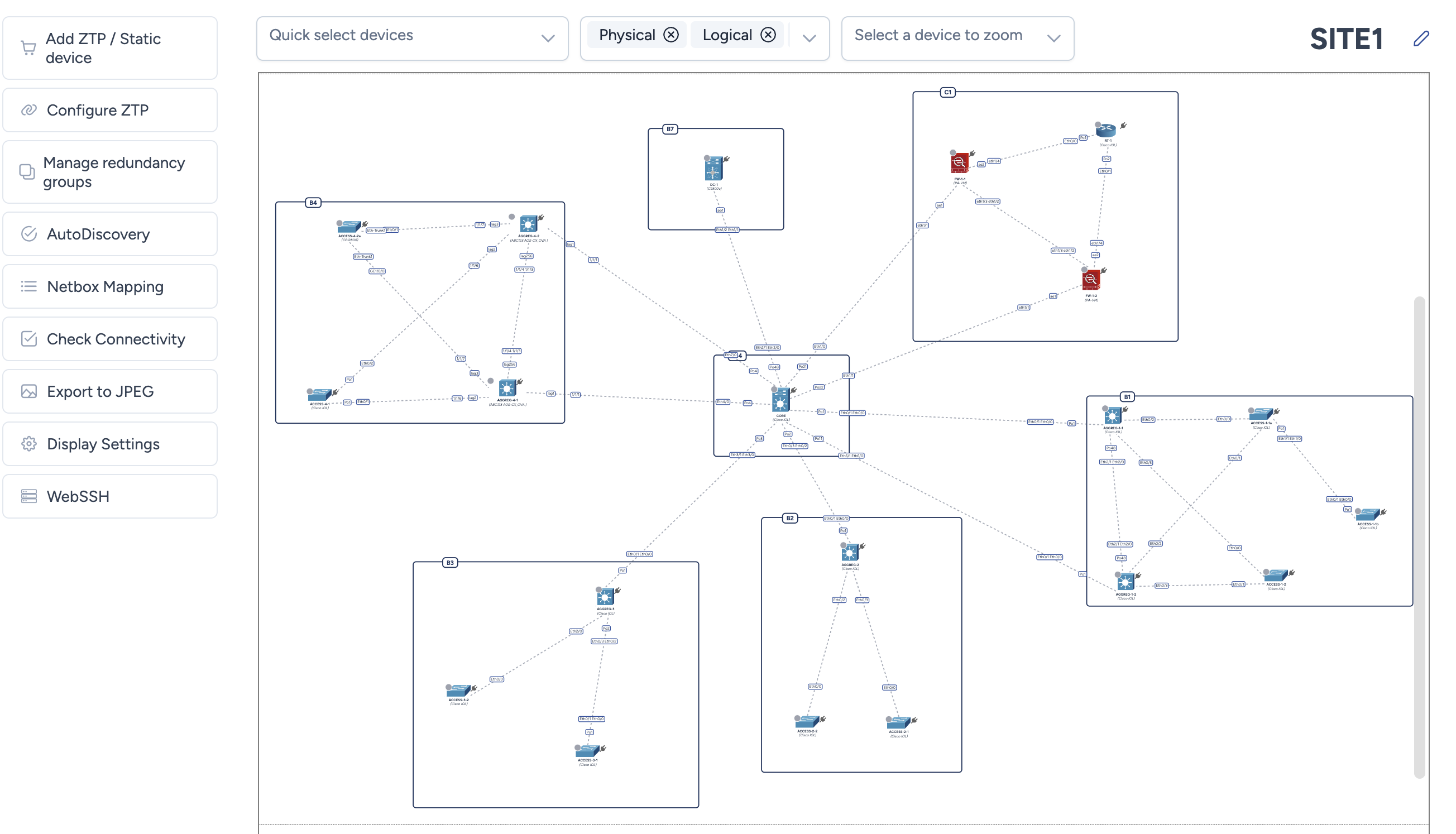
Navigation and Filtering
The top bar gives you several tools to navigate, search, and refine your network view.
Quick Device Selection
The Quick select devices menu lets you rapidly select multiple elements on the map based on different criteria:
- Device types: Select all devices of the same category (switches, routers, etc.)
- Buildings: Select all devices located in a specific building
- Redundancy groups: Select the high-availability groups you've configured
Display Options
Active filters appear as clickable badges (for example, Physical, Logical). You can disable them to hide specific topology layers:
- Physical: Manages the visibility of physical connections
- Logical: Manages the visibility of logical links (link aggregation, LAG)
- Hostname: Toggles the display of device hostnames
- Bandwidth: Displays bandwidth on map links.
- Non managed devices: Shows the CDP or LLDP neighbors Avalon does not manage: phones, access points, servers.
- Media color: Colors links according to the detected media type (fiber, copper, etc.). Colors are customizable from Administration > Map > Media colors.
- Unmerge connections: Splits all multi-port connections into individual physical links with port labels on each link. You can also split or group links individually by right-clicking on a link (see Working with a site map).
- Redundancy groups: Visualizes the clustering of redundant devices (MC-LAG, Stack, etc.)
- Bezier path: Draws links as curves rather than segments, which declutters a dense map.
- Traceable connections: Highlights the links for which NetBox knows a detailed cabling path, a prerequisite for the interface trace.
Two options cannot be active together
Media color and Traceable connections paint the very same stroke. Enabling one therefore turns the other off, rather than showing a colour nobody asked for.
Info
If the media type is not detected on one side of the link (e.g., on some Aruba CX devices), Avalon automatically uses the information from the other side.
Search and Centering
The Select a device to zoom dropdown lists all devices present on the map. Start typing a name to instantly filter the list, then select the desired device: the camera will automatically zoom in and recenter the view on it.
Site Editing
The pencil icon located next to the site name (top right) allows you to rename your site at any time.
Management Actions
The left-hand sidebar centralizes access to the site's main operational features:
- Add ZTP / Static device: Opens a modal window to add static devices (non-managed) or onboard new devices via ZTP
- Configure ZTP: Configure and launch Avalon's Zero Touch Provisioning process
- Manage redundancy groups: Create or edit your high-availability groups
- AutoDiscovery: Access settings and launch the network autodiscovery engine
- Netbox Mapping: Define the mapping between Avalon device types/roles and Netbox for this site
- Check Connectivity: Immediately trigger a reachability check on all devices present on the map
- Export to JPEG: Generate and download a high-resolution image of your current topology
- WebSSH : Open the WebSSH modal with a list of all devices available in this site