LDAP Mappings
This feature allows you to automatically assign Avalon roles to LDAP users based on their Active Directory or LDAP groups. This removes the need to manually assign a role to each LDAP user.
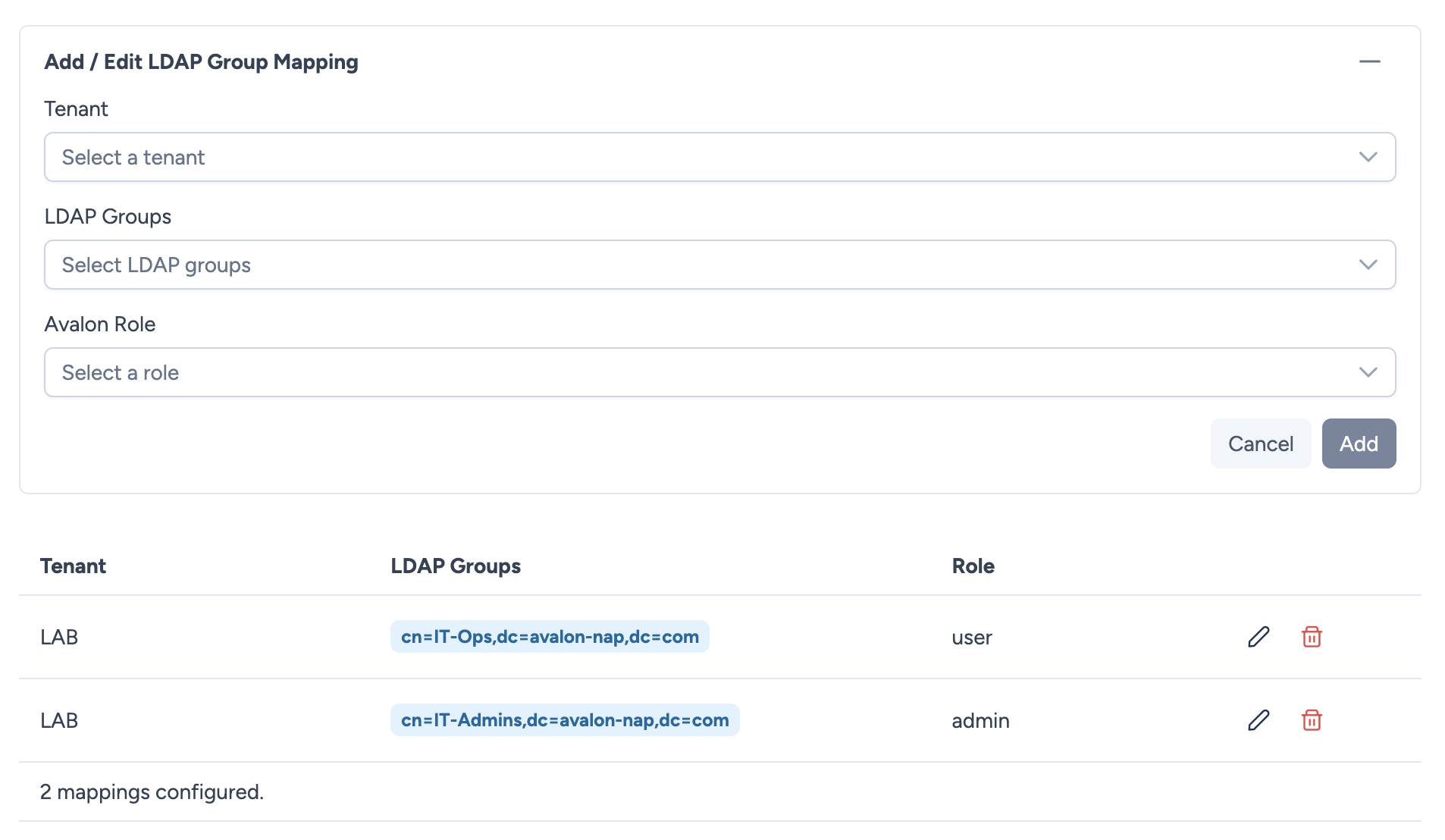
Principle
A mapping associates:
- An Avalon tenant
- One or more LDAP/AD groups
- An Avalon role
When an LDAP user logs in, Avalon retrieves their groups from the directory (memberOf attribute) and matches them against the configured mappings. If one or more of the user's groups match a mapping, the associated role is automatically assigned for the corresponding tenant.
Configuring mappings
For each mapping, you define:
- Tenant: The target tenant.
- LDAP Groups: One or more LDAP groups (multiple selection from detected groups).
- Role: The Avalon role to assign.
You can create as many mappings as needed to cover all your tenants and groups.
Group detection
The list of available LDAP groups is built automatically from the groups of all LDAP users registered in Avalon.
Deleted groups
If an LDAP group is deleted from Active Directory, it is displayed with an orange visual indicator in the interface. The mapping remains in place but will no longer be applied for users who no longer belong to that group.
Role resolution at login
Here is how Avalon determines an LDAP user's roles:
- Successful LDAP connection: the user is authenticated against the LDAP server.
- Group retrieval: Avalon queries the directory to obtain the user's group list (via
memberOf). These groups are cached in the database. - Matching against mappings: the user's groups are compared to the configured mappings.
- Role assignment:
- If one or more mappings match → the associated roles are dynamically assigned.
- If no mapping matches → Avalon falls back to the manual assignment (tenant/role defined in the user profile).
Dynamic resolution
Roles from LDAP mappings are not stored on the user. They are resolved on the fly with each request. This means any mapping change takes effect immediately, without the user needing to log in again.
Conflict management
If a user belongs to multiple LDAP groups that match different mappings for the same tenant, Avalon automatically selects the most permissive role.
The permission scoring is calculated dynamically:
- A role with All permissions enabled gets the maximum score.
- Otherwise, each enabled permission contributes to the score: Read and write scores higher than Read-only, which scores higher than a disabled permission.
This scoring adapts automatically if a role's permissions are modified.
Priority: LDAP mapping vs manual assignment
| Situation | Behavior |
|---|---|
| The LDAP user has groups that match mappings | Roles are determined by LDAP mappings |
| The LDAP user has groups but no mapping matches | Fallback to manual assignment (tenant/role defined in the user profile) |
| The LDAP user has no cached groups | Fallback to manual assignment |
| The user is Local (non-LDAP) | Always manual assignment |
Example
An administrator configures the following mappings:
| Tenant | LDAP Groups | Role |
|---|---|---|
| Production | CN=IT-Admins,OU=Groups,DC=example,DC=com |
admin |
| Production | CN=IT-Ops,OU=Groups,DC=example,DC=com |
network_operator |
| Staging | CN=IT-Ops,OU=Groups,DC=example,DC=com |
admin |
A user who is a member of the IT-Ops group will get:
- The network_operator role on the Production tenant
- The admin role on the Staging tenant
A user who is a member of both IT-Admins AND IT-Ops groups will get:
- The admin role on the Production tenant (the most permissive between
adminandnetwork_operator) - The admin role on the Staging tenant