SMTP
Configure the connection details for an external SMTP (Simple Mail Transfer Protocol) server. This configuration is required for enabling email-based features across Avalon.
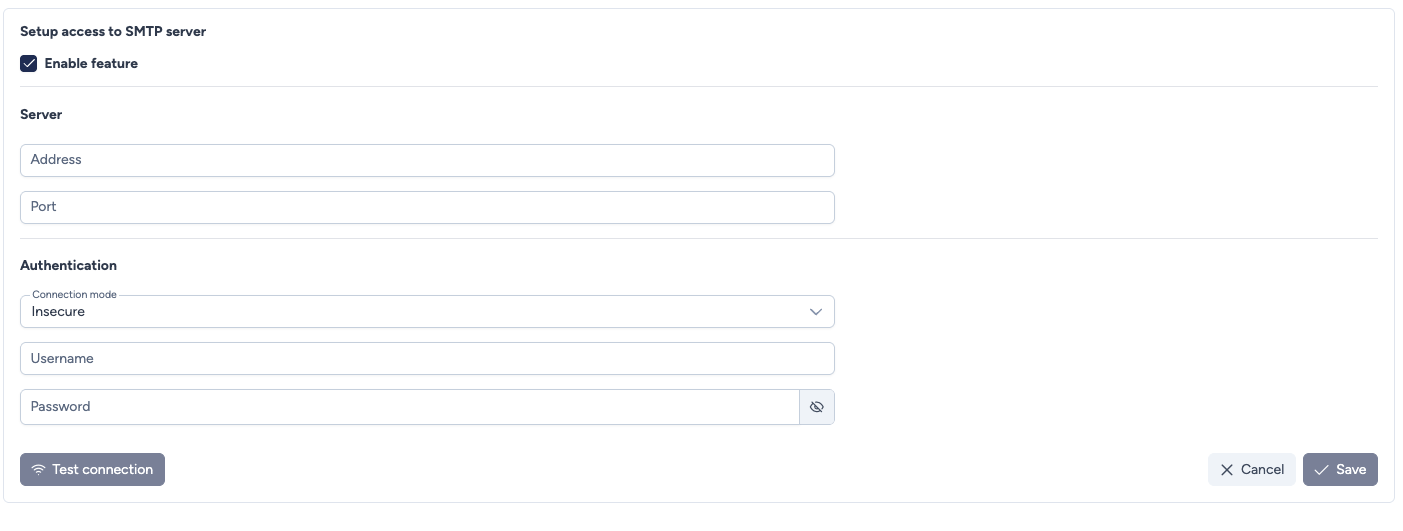
Configuration parameters
This section defines feature activation, server connection, and authentication details.
- Enable feature: Checkbox to activate or deactivate the use of the configured SMTP server throughout the application.
- Address: The IP address or FQDN (Fully Qualified Domain Name) of the SMTP server host.
- Port: Port used to establish the SMTP connection.
Common values:
25(insecure or local relay)465(SSL)587(TLS)
- Connection mode: Specifies the security protocol to use:
- TLS (recommended for most servers)
- SSL (legacy secure mode)
- Insecure (no encryption)
- No authentication (useful for trusted relay servers)
- Username: The username required to authenticate with the SMTP server.
- Password: The password associated with the provided username.
- Sender email: The address messages sent by Avalon will come from.
- Required in No authentication mode.
- Optional in the other modes: left empty, the Username is used as the sender, which suits servers where the account sends under its own address, such as Microsoft 365 or Gmail.
- Fill it in when going through a relay service, whose login is not an address that can be used as a sender. The address must be allowed by the server or the service, otherwise the message is rejected after an otherwise successful authentication.
Security and Delivery
For production environments, we highly recommend using TLS or SSL. Many external mail providers (like Gmail or Microsoft 365) reject insecure connections.
Actions
- Test connection: Highly recommended. Connects to the SMTP server with the provided settings and checks authentication. No message is sent: this test therefore validates neither the sender address nor delivery.
- Cancel: Discards any unsaved changes and exits the setup.
- Save: Saves the connection and authentication parameters for the SMTP server.