ZTP Configuration
This module orchestrates the Zero Touch Provisioning (ZTP) process. It allows you to prepare your network environment so that new devices can automatically retrieve an IP address and a minimal configuration upon their first boot.
Standards-based ZTP
Avalon's ZTP implementation relies on standard DHCP mechanisms supported by all major network vendors. The only requirement is that your devices can send DHCP requests on first boot (factory default behavior). Avalon automatically configures the necessary DHCP relay on the device hosting the IP gateway.
Prerequisites
Before launching the process, ensure your network meets the following requirements:
- Network flows: Avalon's built-in DHCP and TFTP servers must be reachable from the management network. See the Flow Matrix for details.
- IP Gateway: The ZTP VLAN gateway must be a switch managed by Avalon capable of supporting DHCP relay.
- Note: If your gateway is a firewall, contact your Avalon account team to verify your model's compatibility with this feature.
- Isolation: We strongly recommend isolating ZTP processes in a dedicated VLAN (and ideally a specific VRF) for security reasons.
Configuration Parameters
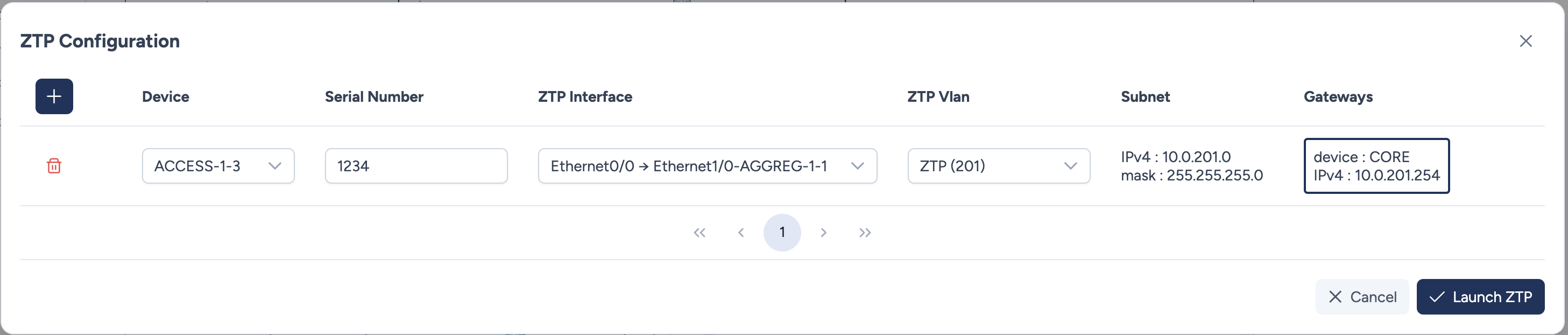
You can add multiple devices to the ZTP queue simultaneously.
- Device: Select the target device from the dropdown.
- This list displays devices created with the "ZTP" method in the Add ZTP / Static device menu.
- Serial Number: The exact hardware serial number of the device.
- Avalon uses this number to identify the device when it requests its configuration.
Unknown serial number
If you don't know the serial number yet, enter a temporary value. You can correct it later when the device comes online and triggers a mismatch alert.
- ZTP Interface: Select the uplink port on the new device that will connect to the network.
- ZTP Vlan: Select the network segment used for provisioning.
- Gateway: Avalon automatically detects and displays the L3 gateway for the selected VLAN.
Automation Process
When you launch ZTP, Avalon performs a sequence of automated tasks to prepare the network:
- Port Configuration: Configures the upstream switch port (Access VLAN + Spanning Tree Portfast/Edge).
- L3 Configuration: Connects to the Core/Gateway switch and enables DHCP Relay (pointing to Avalon) if not already active.
- Server Provisioning:
- Creates a dedicated DHCP pool in Avalon's internal server.
- Generates a Minimal Configuration file (Conf Min) tailored to the device model and makes it available via TFTP.
Next Steps
The ZTP process is now ready to onboard new devices.
Monitor the progress
Once the device is plugged in, you can track the provisioning steps (DHCP request, serial validation) and handle any potential serial number mismatches in the Inventory section.