Zero Touch Provisioning (ZTP) status
Real-time view of all devices undergoing ZTP provisioning. Allows you to monitor progress, validate identities, and resolve serial number mismatches.

Status Indicators
The table displays the two key stages of the process:
-
Conf Min:
- Not Loaded: The device has not yet retrieved its minimal configuration.
- Loaded: The device has retrieved its minimal configuration.
-
Serial:
- Not Checked: The device does not yet have the minimal configuration, including a local account generated by Avalon, which will allow the ZTP process to connect via SSH to the device to verify the serial number.
- Mismatch: The device is accessible via SSH but the serial number presented does not match the expected one.
- Checked: The device is identified and its configuration can be completed manually in version 1.4.1.
Handling Serial Mismatches
A "Mismatch" alert is expected when a temporary serial number was used during the initial declaration.

Resolution process:
If you used a temporary serial number, you can use this resolution process:
- Click the gear icon next to the "Mismatch" badge.
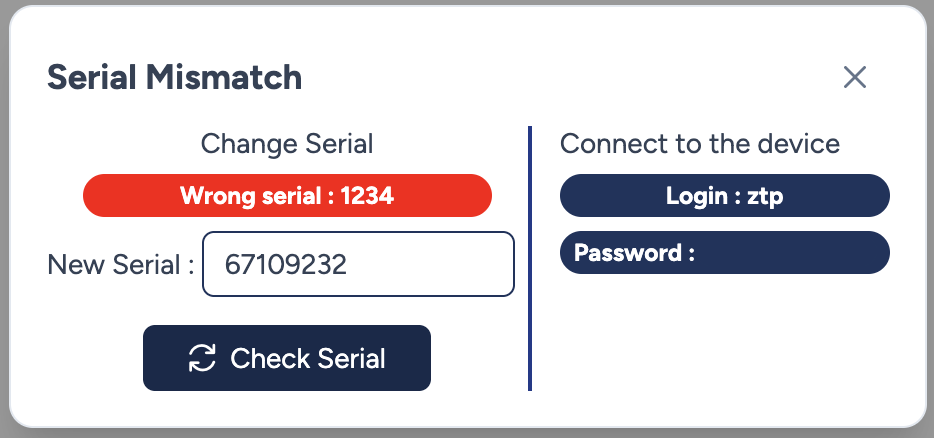
- A modal opens, displaying the Wrong serial (the serial number configured by the user).
- Update: Connect to the device using the local account displayed in the modal. Verify the serial number of the device that was installed. If this number matches the expected one, you can update it in the New Serial field in the modal.
- Click Check Serial to update the database and authorize the device.
Finalization
Once the serial number is validated, the status changes to green.

- Conf Final (Push): This action triggers the deployment of the full production configuration (interfaces, routing, security policies).
Roadmap
The automated generation and deployment of the Final Configuration are under development. The "Push" button has no effect in version 1.4.1.