Create a service account
Before creating a tenant, you need at least one service account. Avalon uses service accounts to connect to network devices and execute operations (services, data gathering, autodiscovery, etc.).
Access the Service Accounts page
Navigate via the top menu Backoffice → Administration → Service Accounts.
Create a service account
Click the + button to open the creation form.
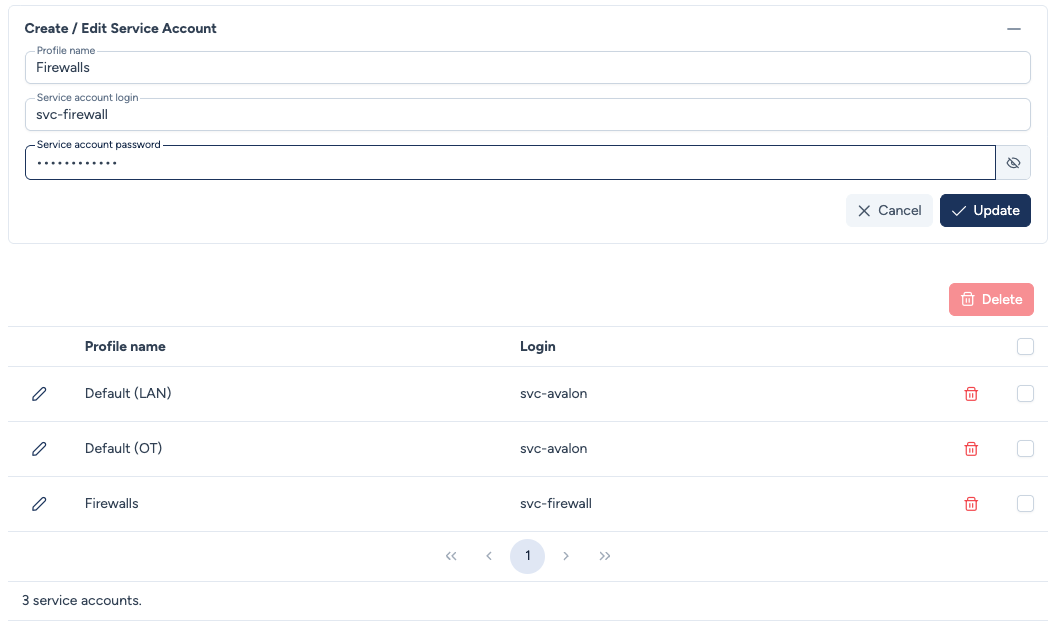
Fill in the following fields:
- Profile name: A descriptive name to identify the service account (e.g.,
Default (LAN)). - Service account login: The login used to connect to devices.
- Service account password: The associated password.
Security
The password is never displayed after creation. You can update it at any time by entering a new value.
For the full details (binding to tenants and device types, credential resolution), see the Service Accounts page.
Move to tenant creation!
Now that you have a service account, it's time to create your first tenant.