Role management
Since version 1.3.5, Avalon includes a Role-Based Access Control system (RBAC). Each role defines a set of permissions that precisely determine what actions a user can perform in the application.
A user can be assigned a different role per tenant, enabling fine-grained access control based on the management scope.
Migration from version 1.3.4
Existing users
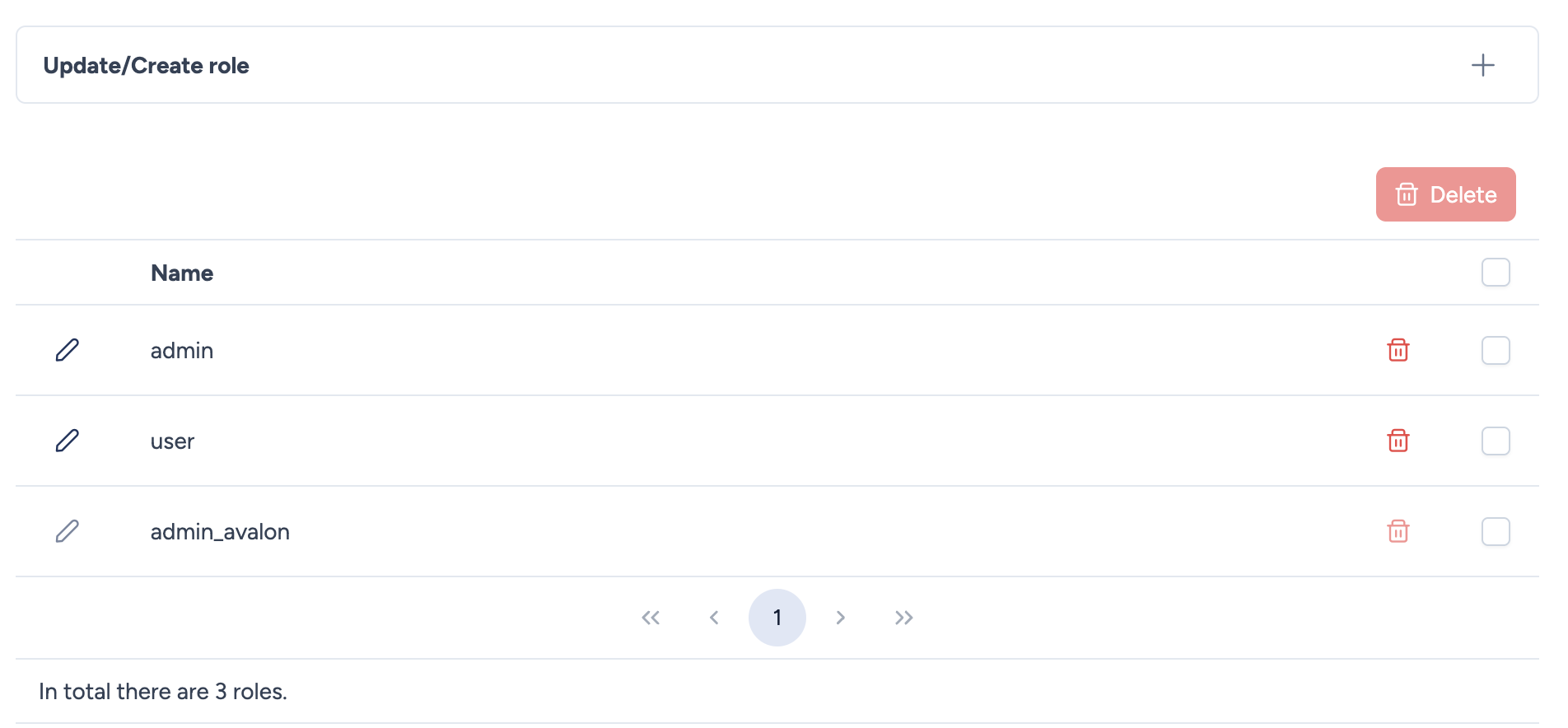
If you are upgrading Avalon from a version prior to 1.3.5, the following roles are automatically created:
- admin: Corresponds to the former admin role. All permissions are enabled (full access).
- user: Corresponds to the former user role. Permissions are set to read-only across all pages.
- admin_avalon: New role dedicated to the
adminsystem account. This account is automatically associated with this role with permissions limited to managing users, tenants and roles. Additionally, theadminaccount only has access to theadmintenant.
Existing users retain their current access. You can then create new custom roles and reassign them as needed.
Create or edit a role
To create a new role, click the + button at the top of the page. To edit an existing role, click the pencil icon next to its name.
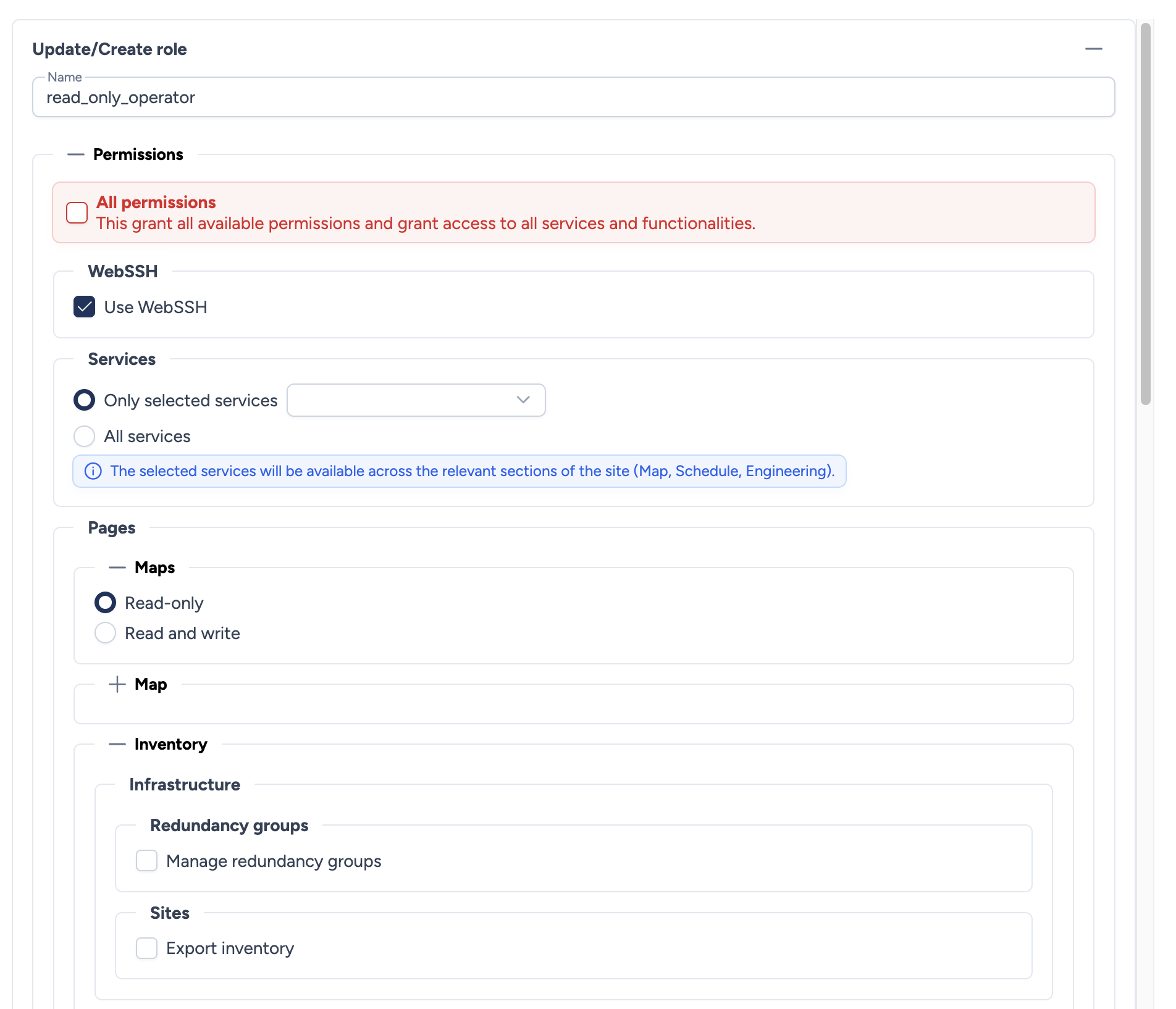
The role configuration form includes:
- Name: The role name. Use a descriptive name (e.g.,
network_operator,read_only,site_admin).
Permissions
Permissions are organized in hierarchical sections. You can enable the All permissions checkbox to grant full access, or configure each section individually.
All permissions
| Option | Description |
|---|---|
| All permissions | Grants all permissions and access to all services and functionalities. Equivalent to the admin role. |
WebSSH
| Option | Description |
|---|---|
| Use WebSSH | Allows the user to open SSH sessions to devices via the integrated WebSSH client. |
Services
Controls which services (service templates) the user can execute from the map, schedule or engineering.
| Option | Description |
|---|---|
| Only selected services | The user can only use the services selected in the dropdown list. |
| All services | The user can use all available services. |
Info
Selected services will be available across the relevant sections of the site (Map, Schedule, Engineering).
Pages
Maps
Controls access to the page listing all site maps.
| Option | Description |
|---|---|
| Read-only | The user can view maps but cannot modify them. |
| Read and write | The user can view and modify maps. |
Map
Controls available actions within a site map.
| Section | Option | Description |
|---|---|---|
| Devices | Create static device | Allow creating static devices on the map. |
| Create ZTP device | Allow creating ZTP devices on the map. | |
| Delete device | Allow deleting devices from the map. | |
| Other actions | Export JPEG | Allow exporting the map as JPEG. |
| Use AutoDiscovery | Allow launching an AutoDiscovery process. | |
| Connect devices | Allow creating links between devices. | |
| Manage buildings | Allow managing buildings on the map. | |
| Move devices, buildings and overlays | Allow moving elements on the map. |
Inventory
Infrastructure
| Section | Option | Description |
|---|---|---|
| Redundancy groups | Manage redundancy groups | Allow managing redundancy groups. |
| Sites | Export inventory | Allow exporting the site inventory. |
Network services
| Section | Option | Description |
|---|---|---|
| VLANs | Browse VLANs | Allow browsing VLANs. |
| Custom services | Manage templates | Allow managing custom service templates. |
| Manage configured services | Allow managing configured services. |
Hardware catalog
Each catalog item can be configured independently with an access level:
| Item | Options |
|---|---|
| Vendors | Read-only / Read and write |
| Device families | Read-only / Read and write |
| Device models | Read-only / Read and write |
| Device images | Read-only / Read and write |
| Interfaces list | Read-only / Read and write |
Schedule
| Option | Description |
|---|---|
| Read-only | The user can view scheduled tasks but cannot create or modify them. |
| Read and write | The user can view, create and modify scheduled tasks. |
Engineering
| Option | Description |
|---|---|
| Read-only | The user can view workflows but cannot execute them. |
| Read and write | The user can view and execute workflows. |
Transactions
| Option | Description |
|---|---|
| View transactions history | Allow viewing the transactions history. |
Audit
| Option | Description |
|---|---|
| Use data gathering | Allow using data gathering. |
| Explore configurations | Allow exploring device configurations. |
| Compare configurations | Allow comparing configurations. |
| Browse device logs | Allow browsing device logs. |
| Manage mail alerts | Allow managing email alerts. |
| Use compliance | Allow using compliance checks. |
Export configurations
| Option | Description |
|---|---|
| View saved configurations and export them | Allow viewing and exporting saved configurations. |
Administration
| Option | Description |
|---|---|
| Manage tenants | Allow managing tenants. |
| Manage users | Allow managing users. |
| Manage roles | Allow managing roles. |
| Manage API keys | Allow managing API keys. |
| Manage LDAP configurations | Allow managing LDAP configuration. |
| Manage SMTP configurations | Allow managing SMTP configuration. |
| Manage backup configurations | Allow managing backup configuration. |
| View monitoring data | Allow viewing Avalon monitoring data. |
Profile
| Option | Description |
|---|---|
| Update username & email | Allow the user to update their username and email address. |
Assigning roles to users
Roles are assigned to users from the User management page. When creating or editing a user, you select a tenant and then a role for that tenant.
A single user can have different roles depending on the tenant:
- Role
adminon the Production tenant - Role
read_onlyon the Staging tenant
The active role is determined by the currently selected tenant in the interface. When the user switches tenants, their permissions change automatically.
Delete a role
To delete a role, click the trash icon next to its name, or select multiple roles and use the Delete button for bulk deletion.
Warning
A role cannot be deleted if it is still assigned to users. Reassign the affected users to another role first.