Redundancy Groups
This page allows you to manage Redundancy Groups.
In Avalon, a redundancy group is a logical attribute stored in the database, completely independent of device configuration.
Use case
Redundancy groups allow you to manually tag devices that share a redundancy relationship to enforce safety rules during the device operating system upgrade process.
Note
Avalon natively implements mechanisms to protect certain topologies:
- In version 1.4.1, Aruba CX switches configured in MC-LAG are protected so that only an upgrade initiated from the Primary member can be executed. An attempt to upgrade the Secondary member will result in Avalon refusing to execute the upgrade.
- This protection does not require creating a Redundancy Group for MC-LAG pair members.
Group list details
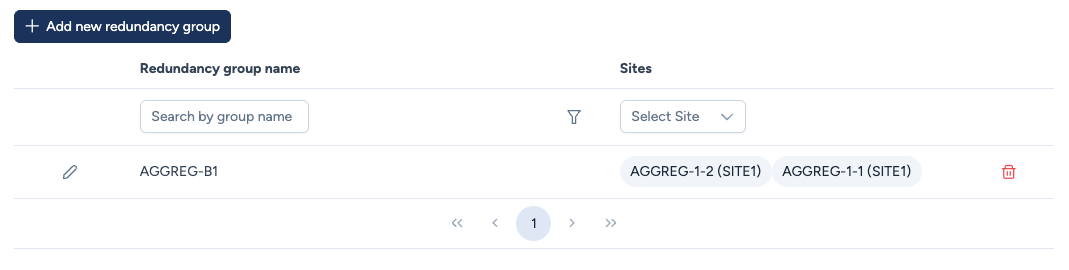
The table displays the configuration of these logical associations:
- Redundancy group name: The unique identifier defined for this group (e.g.,
AGGREG-B1). - Sites / Members: Lists the physical devices included in the group.
- Note that each member is displayed with its associated Site (e.g.,
DEVICE-NAME (SITE-NAME)). - A single redundancy group can technically include devices located in different sites (Geo-Redundancy).
- Note that each member is displayed with its associated Site (e.g.,
Actions
- + Add new redundancy group: Click to define new groups.
- Edit (pencil icon) Enters inline editing mode to add or remove members.
- Delete (trash icon) Removes the logical grouping from the database. This does not delete the physical devices from the inventory.
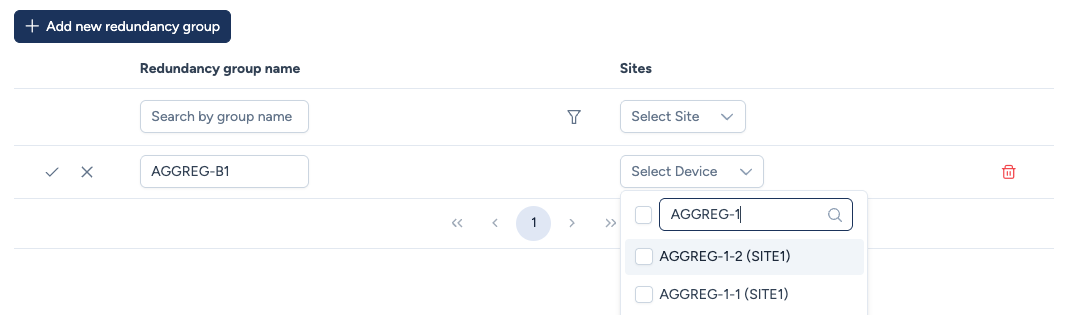
Configuration process:
- Name: Define a unique identifier for the new group.
- Device Selection: Use the dropdown menu to search and assign devices to the group.
- Logic: You can select two or more devices.
- Constraint: A device can belong to only one redundancy group. Only devices not currently assigned to a group will appear in the search.
- Validation: Click the check icon to save the changes.
Roadmap
Multi-site topology visualization: While the Inventory allows defining redundancy groups that span multiple physical sites (Geo-Redundancy), the map currently displays the network on a per-site basis.
Consequently, multi-site groups will not yet appear as a single unified node in the graphical view. Multi-site visualization support is currently under investigation.