Zabbix
Inventory → Monitoring → Zabbix.
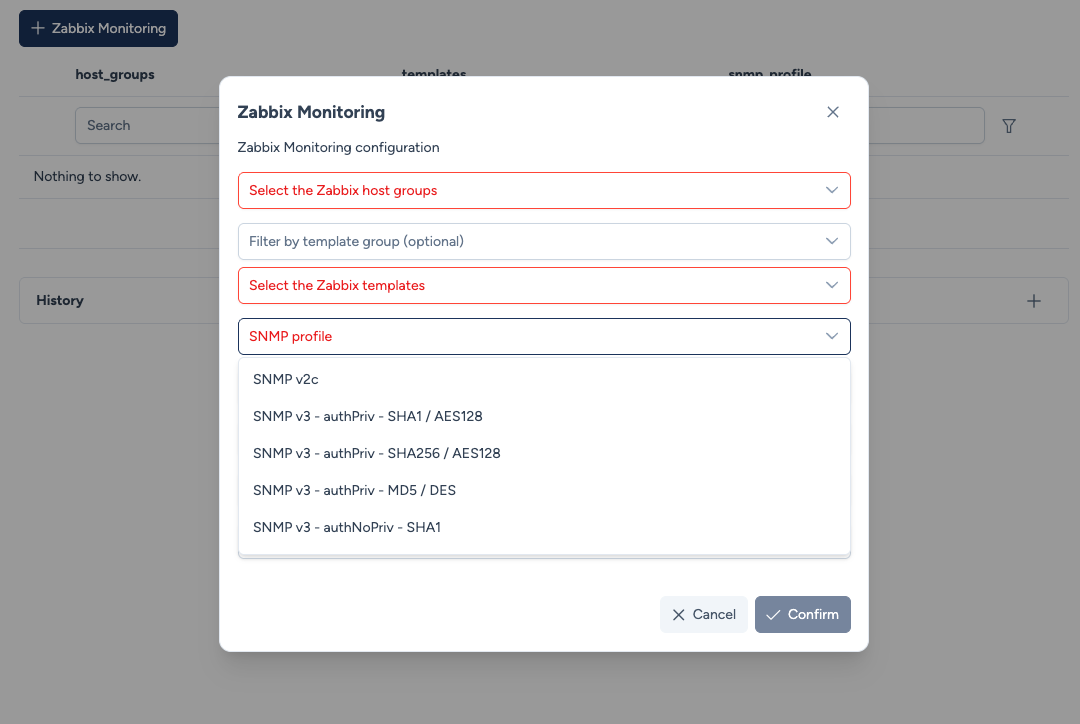
The Zabbix Monitoring service declares a device in Zabbix from Avalon: the host, its groups, its templates and its SNMP profile, without re-entering an inventory Avalon already knows.
This screen does not declare devices one by one. It defines reusable registration profiles, which you then point at from an engineering rule or from the map.
No configuration is applied to the device
Unlike other services, this one writes nothing to the device: it talks to the Zabbix API. It therefore works whatever the platform, including on a device Avalon cannot configure at all.
In return, the SNMP profile describes what Zabbix will use to poll the device. Making sure the device actually answers over SNMP is up to you.
Creating a profile
The table lists the existing profiles. Each carries a name and the following three parameters:
- Host groups: the Zabbix host groups the device will be filed under. The list is read from your Zabbix instance.
- Templates: the Zabbix templates to apply to the host. Read from your instance as well.
- SNMP profile: the SNMP version and credentials Zabbix will use to poll the device.
A History panel, collapsed by default, keeps a trace of the registrations already performed.
Macro names
Four optional fields let you name the Zabbix macros carrying the SNMP credentials: community, security name, authentication passphrase and privacy passphrase.
Leave them empty in the common case: Avalon then uses the following names.
| Field | Default macro |
|---|---|
| Community | {$SNMP_COMMUNITY} |
| Security name | {$SNMP_SECNAME} |
| Authentication passphrase | {$SNMP_AUTH_PASSPHRASE} |
| Privacy passphrase | {$SNMP_PRIV_PASSPHRASE} |
{$SNMP_COMMUNITY} is a de facto convention, used by the Zabbix SNMP templates and by the community
library. The other three names are Avalon's own. For SNMPv3, Zabbix does resolve user macros in
the interface fields, security name and passphrases, but prescribes no name: each instance picks its
own.
So check the names your own templates use, and fill in a field where it differs. A field left empty keeps its default, so there is no need to fill them all in as soon as one of them changes.
These are macro names, never secrets
Avalon only writes the macro name here. The corresponding values stay defined on the Zabbix side and never pass through Avalon.
Avalon checks that the macros are defined somewhere
Zabbix resolves a macro from the host, then from the templates linked to it, then from the global macros. It checks nothing at creation time: a host whose macros resolve nowhere is created, looks configured, and is never polled.
So before creating the host, Avalon looks at which SNMPv3 macros your profile refers to without anything defining them, and reports it in the transaction. It is a warning, not a refusal: you may be about to define them on the Zabbix side.
Only the macros the chosen security level actually needs are checked.
Declaring a device
Once the profile is created, registration is triggered in two ways:
- from the map, by selecting one or more devices then the service;
- from an engineering rule, which points at the profile and applies it to every device meeting the condition.
This is what avoids repeating the groups, the templates and the SNMP profile rule after rule: they are decided once here.